V1RST New Chapter Theme for Windows
After moving to Kapital Entertainment, V1RST tried a new concept where this time each member was involved in a make over through character development by highlighting their respective strengths while learning to conquer their weaknesses, collaborating with many new people.
This article shows a Microsoft® Windows® Operating System Themes of V1RST New Chapter. This theme contains two full members themes and 7 individual members themes. Executable installer version is available for Windows 9x and Windows NT.40 through Windows Vista for all users while Windows 7 and above uses individual Themepack file for current user only. The theme uses Windows Classic visual style (Aero Lite High Contrast visual style for Windows 8 and later) and also Windows Aero visual style exclusively for Windows Vista and later.
Theme Preview
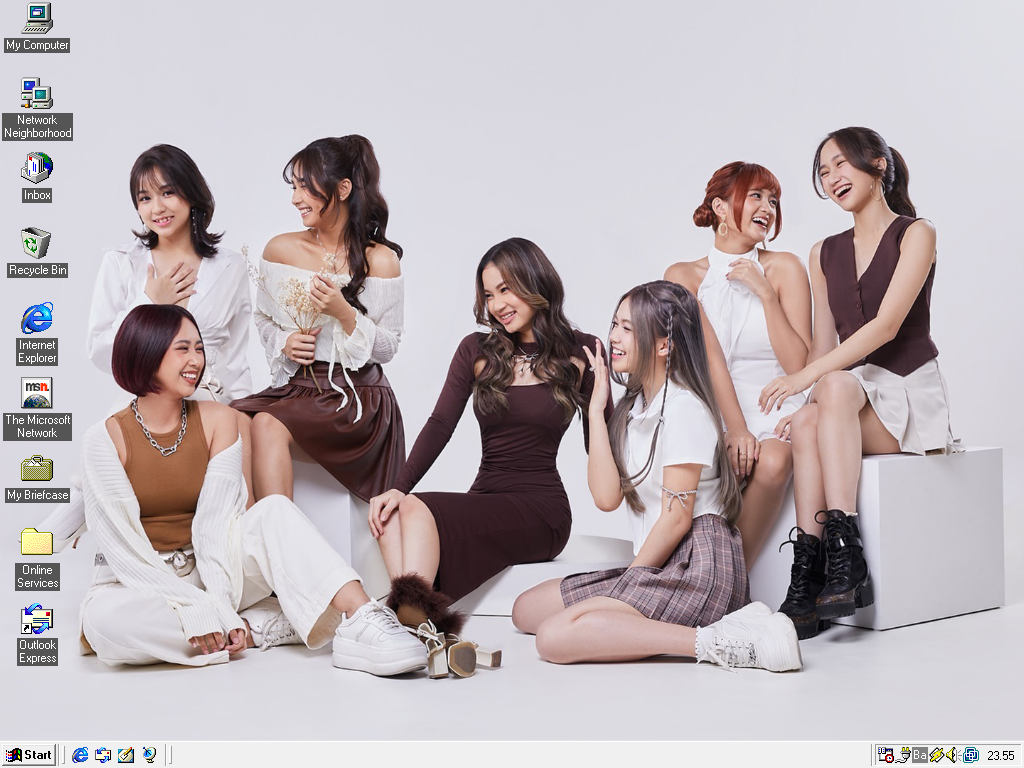
Windows 95 - Variant 1

Windows 95 - Variant 2
CHANGELOG
Executable File Downloads
Instructions
- Click the link or button below.
- Run the installer and follow instructions.
- Apply the theme using Desktop Themes (9x, NT 4.0, 2000), or Display Properties (XP), or Personalization > Themes (Vista).
WARNING!
- For Luna theme with silver variant in Windows Server 2003, Themes service must be started.
- For Windows Server 2008, Desktop Experience feature must be installed.
- Themes is not supported for Core editions of Windows Server 2008.
Windows 9x
Windows NT
Themepack File Downloads
Instructions
- Click the link or button below.
- Open the .themepack file and the theme should applied automatically.
WARNING!
- Classic theme variant only used in Windows 7 or Windows Server 2008 R2. Installing it on Windows 8 or Windows Server 2012 and later uses High Contrast variant.
- For Windows Servers prior to Windows Server 2016, Desktop Experience feature must be installed.
- Themes is not supported for Core editions of Windows Server 2008 R2 and later.
Windows 7, Windows 8, Windows 8.1, Windows 10, Windows 11, Windows Server 2008 R2, Windows Server 2012, Windows Server 2012 R2, Windows Server 2016, Windows Server 2019, Windows Server 2022, Windows Server 2025
Old Versions
If you want to get the old version, click this button or link
GitHub
USE MODERN BROWSER ONLY FOR THE LINK BELOW
Legal Information
This software is licensed under MIT License.
V1RST New Chapter Themes IS NOT affiliated, associated, or in any way officially connected with Kapital Entertainment.
© All rights reserved Kapital Entertainment 2024 |


